
[font=Roboto, BlinkMacSystemFont, -apple-system,]RULES[/font][font=Roboto, BlinkMacSystemFont, -apple-system,]:[/font]
a. use factory bin file if you're still stocked tplink firmware
b. use sysupgrade bin file for those user who are already on openwrt firmware
(uncheck keep settings on firmware upgrade option to avoid errors)
no need to use both factory and sysupgrade bin file, just buy one with it depending on which condition your router meets.
2. Go to Luciwebgui http://192.168.1.1
(if webgui does not work, restart / reboot your router)
3. Click Services -> Openvpn
4. Select the server to use, click edit change your username and password
update: z1 z2 z3 z4 & z5 are no longer available. you can still use z6 server.
if you still do not work on z6 server, upload your custom ovpn file.
update2: check page 15 for a new additional server pat.ch
5. Click enable tick box, save and apply.[/font]
[font=arial, sans-serif][size=medium][font=Roboto, sans-serif]QUICK TUTORIAL FOR UPLOADING AND CONFIGURING CUSTOM OVPN CONFIG
there are screenshots that I'm about to make ovpn file upload tutorial. I just do not know the tutorial.
here is the quick tutorial:
1. go to luci webgui @ http://192.168.1.1
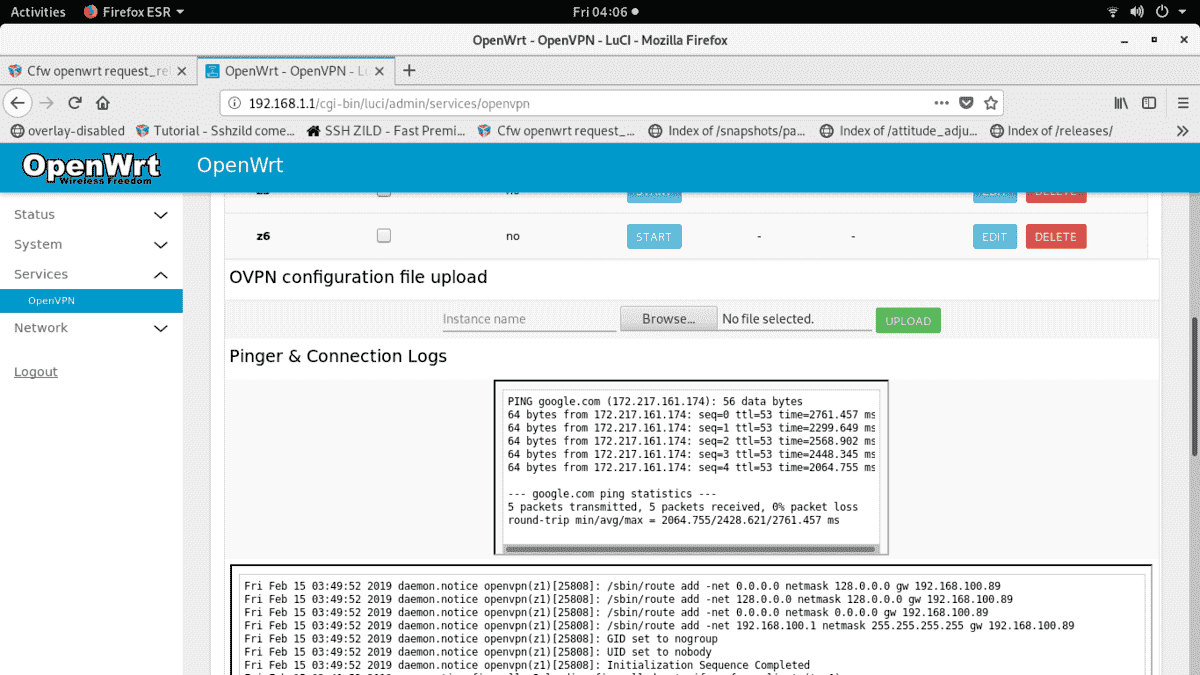
2. click services tab then openvpn
3. create instance name. for now use all small letters and avoid using spaces or any special character. just make it simple for this example i will use mycustomserver as my instance name
4. click Browse, locate your ovpn config file
5. click Upload then save.
6. Now edit your ovpn config
there is an auth-user-pass edit it, then add an instance name that you created
in this example i use mycustomserver as my instance name so it will also use the .auth file name
auth-user-pass mycustomserver.auth
7. to edit your username and password. delete it, change your own user account
and password. follow this format only
thisismyusername
thisismypassword
8. click save, go back or click overview click enable tick box
9. click save and apply
10. now press start
check your logs below, when you see an initialization sequence completed it means you're connected to openvpn.
Some Basic Error Troubleshooting tips
network unreachable
make sure that you subscribe to sun tu promo. check that you might have expired that promo or you may be blocked by your openvpn. proper connection of router to modem is via openwrt router WAN port connected to LAN port of a modem. make sure that they have different ip address so they do not have a conflict with the dhcp server of the modem.
AUTH FAILED
wrong username and password
unmissing parameters / unrecognized option
something wrong with ovpn config. other than config router's ovpn than smart phone or pc openvpn client. you can not just use it and just upload ovpn files using your phone or pc.
Final Note: if you think my cfw really helps you, i'll accept donation via gcash. This CFW will remain free. If you have
some ideas on how to improve this project or want some features included please pm me. I will implement it as long as I can. thanks to all support, to the person who donates and to those who assist in setting up the ovpn config of my cfw default servers.
My builds have extra theme installable on ram, if you want try this theme issue command easteregg on putty terminal
to install additional themes (rosy, bootstrap, freifunk-generic) on RAM. easteregg command should be used only routers that has 4MB flash. No need to run this command if your router has 8mb flash or higher.[/font][/font][/size]
[font=arial, sans-serif][size=medium][font=Roboto, sans-serif]
 [/font][/font][/size]
 DO NOT BE A LEECHER
- Must be at least grasshopper rank, leecher pa-rankup muna kayo.
- I will give consideration on those leechers rank basta old account pero depende pa rin sa dami ng post. AUTO-denied for fresh new account!
- DO NOT SELL MY CFW. You don't have any rights to do that.
- DO NOT DISTRIBUTE MY CFW BUILDS or upload it on other site. Everybody are welcome to request in this thread as long as ma-meet nila yung grashopper rank na requirement ko.
- Please report to me kapag may nakita kayong seller na binibenta nirerelease kong firmware
- NO MORE SPOON FEEDING!!!
[font=Roboto, BlinkMacSystemFont, -apple-system,]CFW FEB 12 PAT.CH 1 RELEASED!
changelog: [/font][font=Roboto, BlinkMacSystemFont, -apple-system,]fix rosy theme installation on ram[/font]
[font=Roboto, BlinkMacSystemFont, -apple-system,]added bootstrap and freifunk-generic themes[/font]
[font=Roboto, BlinkMacSystemFont, -apple-system,]GOOGLE DRIVE CFW link:
WR940N V6 EU [/font]
[font=Roboto, BlinkMacSystemFont, -apple-system,]https://drive.google.com/file/d/1enXCAtENlYgHW5nFoDtHMTjX6dug1L4C/view?usp=sharing[/font]
[font=Roboto, BlinkMacSystemFont, -apple-system,]WR940N V6 US[/font]
[font=Roboto, BlinkMacSystemFont, -apple-system,]https://drive.google.com/file/d/1n57XJcg5gLiBcrTFi6UXvwx-MSFNP9Gb/view?usp=sharing[/font]
[font=Roboto, BlinkMacSystemFont, -apple-system,]WR941ND V5 [/font]
[font=Roboto, BlinkMacSystemFont, -apple-system,]https://drive.google.com/file/d/1WB-NXFTD270UsnJfGha477kDVUSii5Qe/view?usp=sharing[/font]
[font=Roboto, BlinkMacSystemFont, -apple-system,]WR740N V4 [/font]
[font=Roboto, BlinkMacSystemFont, -apple-system,]https://drive.google.com/file/d/1dZ6gWLxA9nJDpSXoL_IosabO2fB9xW3W/view?usp=sharing[/font]
[font=Roboto, BlinkMacSystemFont, -apple-system,]WR741ND V4[/font]
[font=Roboto, BlinkMacSystemFont, -apple-system,]https://drive.google.com/file/d/1ZOBtIJ6qJJ1FUw3CQ9S-B7We_PiwcEmm/view?usp=sharing[/font]
[font=Roboto, BlinkMacSystemFont, -apple-system,]WR841N V9[/font]
[font=Roboto, BlinkMacSystemFont, -apple-system,]https://drive.google.com/file/d/1__fSqZdSgZHMu6U0bYEfafOWeUNFv8uB/view?usp=sharing[/font]
[font=Roboto, BlinkMacSystemFont, -apple-system,]WR940N V3 / WR941ND V6[/font]
[font=Roboto, BlinkMacSystemFont, -apple-system,]https://drive.google.com/file/d/1iDgVSkmqtrstFu3uxmmM9HQR3RxSgWnj/view?usp=sharing[/font]
[font=Roboto, BlinkMacSystemFont, -apple-system,]ARCHER C20 V1[/font]
[font=Roboto, BlinkMacSystemFont, -apple-system,]https://drive.google.com/file/d/1-TNruMpTNRHwac6KGuGW3wOlu_t7fEYx/view?usp=sharing[/font]
[font=Roboto, BlinkMacSystemFont, -apple-system,]ARCHER C20 V4 (STOCK TPLINK SHOULD USE TFTP FLASHING)[/font]
[font=Roboto, BlinkMacSystemFont, -apple-system,]https://drive.google.com/file/d/1_ag5-pF8mMyAg4dyAsQOCXLpjlliY249/view?usp=sharing[/font]
[font=Roboto, BlinkMacSystemFont, -apple-system,]Glinet AR150[/font]
[font=Roboto, BlinkMacSystemFont, -apple-system,]https://drive.google.com/file/d/1WOF7keMI79Gr__5WbfE5s3a-_fcGJAKF/view?usp=sharing[/font]
[font=Roboto, BlinkMacSystemFont, -apple-system,]WR840N V2 EU[/font]
[font=Roboto, BlinkMacSystemFont, -apple-system,]https://drive.google.com/file/d/1FwRVj-IWDLXyzqeAVgVvEHW7XCd4W9Ll/view?usp=sharing[/font]
[font=Roboto, BlinkMacSystemFont, -apple-system,]WR841N V8[/font]
[font=Roboto, BlinkMacSystemFont, -apple-system,]https://drive.google.com/file/d/1w2XuY2Vx4j5Stxle2JP6WlxNN7x9OgQ6/view?usp=sharinghttps://drive.google.com/file/d/1w2XuY2Vx4j5Stxle2JP6WlxNN7x9OgQ6/view?usp=sharing[/font]
[font=Roboto, BlinkMacSystemFont, -apple-system,]NOTE: only those who have gdrive access can download this file. kung wala pa kayong access pm me. no need to start new conversation.[/font]
INSTRUCTION:default gui login and putty terminal loginusername: rootpassword: rootwifi password: linuxnoob
a. use factory bin file if you're still stocked tplink firmware
b. use sysupgrade bin file for those user who are already on openwrt firmware
(uncheck keep settings on firmware upgrade option to avoid errors)
no need to use both factory and sysupgrade bin file, just buy one with it depending on which condition your router meets.
2. Go to Luciwebgui http://192.168.1.1
(if webgui does not work, restart / reboot your router)
3. Click Services -> Openvpn
4. Select the server to use, click edit change your username and password
update: z1 z2 z3 z4 & z5 are no longer available. you can still use z6 server.
if you still do not work on z6 server, upload your custom ovpn file.
update2: check page 15 for a new additional server pat.ch
5. Click enable tick box, save and apply.[/font]
[font=arial, sans-serif][size=medium][font=Roboto, sans-serif]QUICK TUTORIAL FOR UPLOADING AND CONFIGURING CUSTOM OVPN CONFIG
there are screenshots that I'm about to make ovpn file upload tutorial. I just do not know the tutorial.
here is the quick tutorial:
1. go to luci webgui @ http://192.168.1.1
2. click services tab then openvpn
3. create instance name. for now use all small letters and avoid using spaces or any special character. just make it simple for this example i will use mycustomserver as my instance name
4. click Browse, locate your ovpn config file
5. click Upload then save.
6. Now edit your ovpn config
there is an auth-user-pass edit it, then add an instance name that you created
in this example i use mycustomserver as my instance name so it will also use the .auth file name
auth-user-pass mycustomserver.auth
7. to edit your username and password. delete it, change your own user account
and password. follow this format only
thisismyusername
thisismypassword
8. click save, go back or click overview click enable tick box
9. click save and apply
10. now press start
check your logs below, when you see an initialization sequence completed it means you're connected to openvpn.
Some Basic Error Troubleshooting tips
network unreachable
make sure that you subscribe to sun tu promo. check that you might have expired that promo or you may be blocked by your openvpn. proper connection of router to modem is via openwrt router WAN port connected to LAN port of a modem. make sure that they have different ip address so they do not have a conflict with the dhcp server of the modem.
AUTH FAILED
wrong username and password
unmissing parameters / unrecognized option
something wrong with ovpn config. other than config router's ovpn than smart phone or pc openvpn client. you can not just use it and just upload ovpn files using your phone or pc.
Final Note: if you think my cfw really helps you, i'll accept donation via gcash. This CFW will remain free. If you have
some ideas on how to improve this project or want some features included please pm me. I will implement it as long as I can. thanks to all support, to the person who donates and to those who assist in setting up the ovpn config of my cfw default servers.
My builds have extra theme installable on ram, if you want try this theme issue command easteregg on putty terminal
to install additional themes (rosy, bootstrap, freifunk-generic) on RAM. easteregg command should be used only routers that has 4MB flash. No need to run this command if your router has 8mb flash or higher.[/font][/font][/size]
[font=arial, sans-serif][size=medium][font=Roboto, sans-serif]
Follow me if you Like if you do not like it either
I do not think it's a tutorial or maybe it might be a but hurt that's a bit .. bye
LIKE LIKE LIKE LIKE
Share Blessing and Knowledge
